
AI-POWERED FINANCIAL PARSER
Bank Statement Converterto Excel, CSV & QBO
Turn native or scanned bank statements into reviewable rows. Source links and balance checks help you verify uncertain entries before export.
Drop your bank statement here
PDF · JPG · PNG · large files process in the background
Choose File- Processed in memory
- No signup required
- 20 pages free every day
Export to the tools you already use
Documented bank layouts and generic parsing rules
 Chase
Chase Bank of America
 Wells Fargo
 Citi
CitiU.S. Bank
 Capital One
 TD Bank
 RBC
RBC Scotiabank
 HSBC
HSBC Barclays
 Lloyds
NatWest
 Santander
 Monzo
MonzoING
BNP Paribas
 Deutsche Bank
 Commerzbank
Intesa Sanpaolo
 UniCredit
BBVA
 CaixaBank
 ANZ
ANZ PNC
PNC Truist
 American Express
 Discover
 Ally
Ally Charles Schwab
 Citizens
 USAA
USAA BMO
BMO CIBC
CIBC TD Canada Trust
 National Bank
 Desjardins
 Nationwide
 Halifax
 Starling
Virgin Money
 Royal Bank of Scotland
 TSB
TSB Revolut
Société Générale
Crédit Agricole
 Crédit Mutuel
 CIC
CICLa Banque Postale
 LCL
LCL Boursorama
 Banque Populaire
 Caisse d'Épargne
 Sparkasse
 Volksbank
 Postbank
 N26
N26 DKB
DKB ING Germany
 HypoVereinsbank
 Banco BPM
 BPER
BPER Monte dei Paschi
 Fineco
 Poste Italiane
 BNL
BNL Commonwealth Bank
 Westpac
 NAB
NAB Macquarie
 Bendigo Bank
No affiliation or endorsement is implied.
How it works
Convert your bank statement in 3 simple steps
Choose a native or scanned statement, review the reconstructed rows and balance flags, then export the result you have checked.
- 1
Upload PDFs or scans
Drop any digital or scanned bank & credit card statements into the AI parser. Seamlessly handles multi-page files (Chase, Wells Fargo, Amex, etc.).
- 2
AI OCR & balance check
Native PDF text and scan images are read, transaction rows are rebuilt across pages, and opening and closing balances are checked when the statement prints them.
- 3
Download CSV, Excel or QBO
Download CSV or Excel, or generate a QBO statement from the rows you reviewed. Test import files in the destination software.
No signup required 20 pages free each day PDF, JPG and PNG accepted
Pricing Plans
Affordable Plans for Accountants & Bookkeepers
Get 20 free pages every day—no credit card. Remaining paid pages can use cloud AI repair when local recognition fails.
Free
$0
to start
20 pages / day
No credit card. Convert native or scanned statements in your browser.
- CSV, Excel, and QBO after review
- PDF, JPG and PNG accepted
Monthly & Annual
From $15
per month
From 500 pages / month
Starter and Professional for accountants and firms. Yearly plans save up to 31%; checkout opens the matching Creem payment page.
- Starter 500 pages / month
- Professional 1,200 pages / month
Business
From $50
per month
From 5,000 pages / month
Volume page allowance, a named contact, and security-review help for larger firms.
- Dedicated account manager
- Security questionnaire support
Bank Statement Packs
One-time pages · valid 12 months
- 100 pages~10–30 statements$4.99
- 500 pages~50–150 statements$23.99
- 2,000 pages~200–600 statements$79.99
- 10,000 pages~1,000–3,000 statements$299
- 50,000 pages~5,000–15,000 statements$999
Need the full Starter / Professional / Business comparison, billing toggle, and checkout? Learn more →
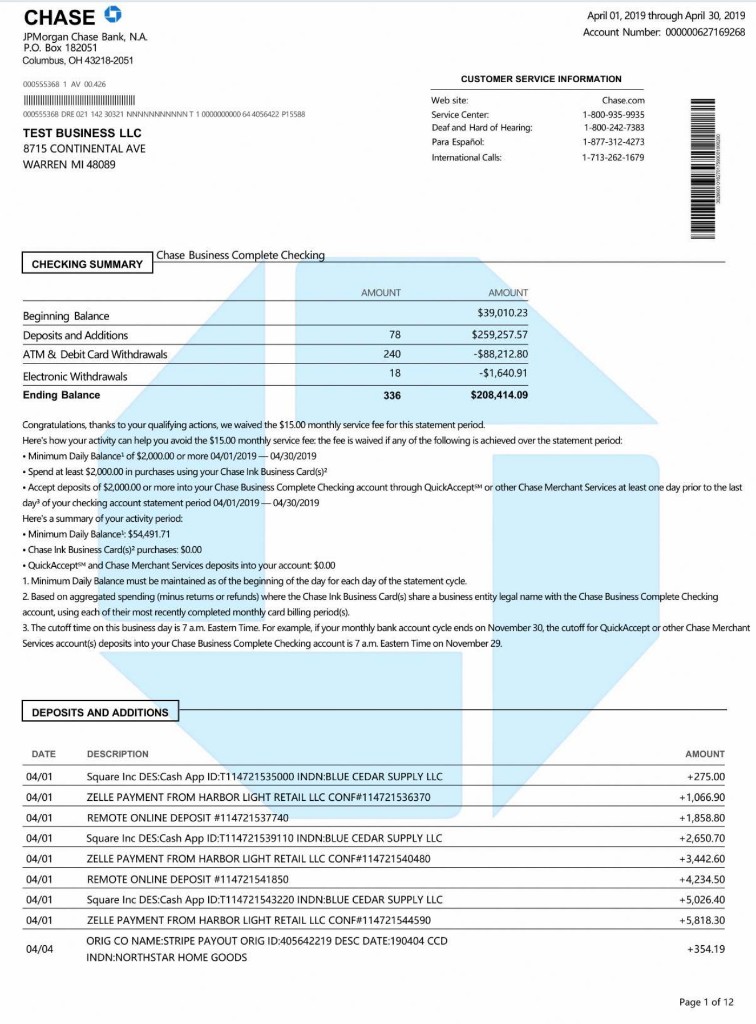
Illustration: a statement PDF on the left becomes an Excel workbook with reviewed transactions on the right.
Built for professionals
Save Hours on AI Bank Statement Processing
The converter reads bank statements as PDF and rebuilds candidate transaction rows for review. Validation flags and source evidence help you find the entries that still need judgment.
Automated Balance Checks
The converter compares opening and closing balances, transaction totals, and printed running balances. Discrepancies are flagged for review.
Documented and generic layouts
A dated bank page identifies a tested layout. Other listed banks use generic parsing rules and require closer review.
Export to CSV, Excel, QBO & More
Create CSV, Excel, QBO, OFX, QFX, or QIF files from reviewed rows. Confirm the result in the destination software before relying on it.
Supports Native, Scanned & Blurry PDFs
Powered by financial AI OCR, our tool extracts data from native PDFs, large scanned pages, or blurry images. Dates, descriptions, and amounts are mapped in this browser.
Designed for your workflow
A smarter way to work for every professional
Accountants
Convert client PDFs to reviewable Excel or CSV rows. Batch-process native or scanned statements and check source-linked flags before import.
Learn moreBookkeepers
Turn PDF statements into reviewable Excel or CSV rows, then create QBO files and test them in the destination accounting software.
Learn moreLenders and underwriters
Automate income and cash-flow review. Convert applicant bank statements into Excel from large scanned PDFs for faster risk assessment.
Learn moreLawyers and forensic accountants
Reconstruct financial rows from multi-page PDFs and trace extracted transactions to their source page. Review the source before using the result as evidence.
Learn more
Running a small business? Bank statement to Excel for small business owners →
Documented bank layouts
Supported Banks & Statement Formats
The directory distinguishes the one currently documented test layout from banks that use generic parsing rules. A listing does not mean that every statement format has been verified.
Showing 12 of 71 documented banks
View all banks71
documented banks
9
countries
- USUnited States15 banks
- CACanada7 banks
- UKUnited Kingdom13 banks
- NLNetherlands1 banks
- FRFrance10 banks
- DEGermany9 banks
- ITItaly8 banks
- ESSpain2 banks
- AUAustralia6 banks
Unlisted and undocumented formats can be tried with generic parsing rules. Review every row and any unmatched source text before export.
Accuracy you can check
Transparent Technology & System Limits
Source references and automated balance checks make the result easier to inspect. They do not replace review of uncertain rows.
Source-linked
Every extracted row
Every reconstructed transaction links directly to its original page and region. Cross-reference data between your Excel/QBO file and the source PDF seamlessly.
OCR and row extraction · opening/closing balance self-check
Balance chain
Smart ledger validation
Our AI runs multi-point math checks across opening balances, transaction totals, and closing balances. Instantly flags missing pages or broken mathematical chains.
OCR and row extraction · opening/closing balance self-check
Adaptive jobs
File size & processing mode
Small files wait for a result. Larger files show Processing with live progress, then move to background, page batches, or a large-job mode. Files over 1 GB need a paid plan. Password-protected or empty files are rejected.
OCR and row extraction · opening/closing balance self-check
A green check means the available balance figures reconcile. It does not prove that every description or date was read correctly. Learn about our validation method
Your data
Understand How Your Statement Is Processed
Standard conversion runs in the browser. If local recognition is unreliable, eligible signed-in plans can send redacted page text for cloud AI repair—not a statement photograph. Identifiers are masked except the last four digits. Check the returned rows before export.
Learn about data handlingLocal-first conversion
The standard conversion path reads statement files in your browser tab. Review the processing mode shown before continuing.
Source-linked review
Extracted transactions retain their source page and validation flags so uncertain rows can be checked before export.
Free without signup
You can try the local converter without creating an account. Paid cloud repair and account features require sign-in.
FAQ
Frequently Asked Questions
Quick, honest answers about QuickBooks integration, bank statement OCR security, and file limits.
Can I directly import the converted file into QuickBooks or Xero?
The converter can create QBO, CSV and Excel files from reviewed rows. Import requirements vary, so inspect the fields and test the result in your accounting software before relying on it.
Is there a page or file size limit for free accounts?
You get 20 free pages every day, with no credit card. Small files wait for a result; larger files show Processing, then background or page-batch jobs. Files over 1 GB need a paid plan. Cloud AI repair uses remaining paid pages—subscription pages, or unused page-pack pages after the free 20 are used.
Do you support scanned, blurry, or photo-based bank statements?
The converter accepts scanned PDFs, JPG and PNG images. OCR quality depends on image quality; unclear rows and balance differences must be checked against the source.
How is my statement processed?
Standard conversion reads the file in your browser. Remaining paid pages may send redacted page text for cloud AI repair when local recognition is unreliable. Account and card numbers are masked except the last four digits. Statement photographs are not sent.
Why use the balance checks?
The converter compares printed balances with reconstructed transaction totals and flags discrepancies. A matching balance is useful evidence, but it does not prove every date or description is correct.
Convert your bank statement today
No signup required. Choose a PDF, review flagged rows and available balance checks, then export Excel or CSV.